
Exodus “No Stream Available” error messages happening more often lately? They were for me too. That’s because Exodus is dead. It’s been replaced by the Covenant add-on.
Goodbye, Exodus. It’s been fun.
Exodus was abandoned by the original developer, lambda. TVAddons announced their plans to open Exodus to the development community as an open source project as previously mentioned. However, they made this announcement shortly before they were taken offline by legal action against them.
When TVAddons came back, they had a new plan for their business moving forward to only host legitimate add-ons.
Needless to say, it doesn’t sound like the Exodus open source project was going to go anywhere.
Then after I started recommending the Smash repository, they changed their directory labels a bit, and one of such changes clearly pointed to the demise of Exodus. This is the folder in Smash repo that only had the Exodus add-on…

Covenant is the Newer, Better Exodus
The good news is that Covenant looks and behaves almost exactly the same as Exodus did. I’m happy about that because I was a big fan of Exodus.
After switching to Covenant, I immediately noticed a lot of things started working better.
- Real-Debrid started working again. I appears that Real-Debrid stopped working on Exodus recently. Even after reauthorizing it many times, I couldn’t get it to work. With Covenant, I have Real-Debrid working perfectly.
- MORE LINKS! I noticed Exodus was declining rapidly in the number of available links. I kept getting No Stream Available in Exodus, or I was getting very few links (which were also very slow). The last episode I tried watching in Exodus only had 2 links and they both buffered a lot. After switching to Covenant, I tried playing the exact same episode and got 104 links, and didn’t have any buffering!
NOTE: Whenever using unofficial Kodi streaming add-ons like this, I recommend using a VPN to protect your privacy. Check out my 4 Reasons Why Kodi Streamers Need a VPN.
Covenant Kodi Add-on Details and Status
| Last Activity: | Status: | ||
| Add-on: | Covenant (1.1.34) | Dec 29, 2017 | Online |
| Repo: | Colossus | Dec 29, 2017 | Online |
| File Source: | https://cyan-lapwing-671209.hostingersite.com/repos (KinkeadTech) | Online | |
| GitHub Username: | covenantkodi | ||
| Working? | |||
See all of the best Kodi streaming add-ons →
How to Install Colossus Repo Using the GitHub Browser
This is the easiest way to install Covenant if you already have the GitHub Browser add-on from TVAddons / Fusion.
If you want to use the GitHub Browser to install the Colossus repo, then follow my tutorial on how to install the GitHub Browser. After you have the GitHub Browser add-on installed, you can easily install the Colossus repo simply by searching for the GitHub username:
covenantkodi
After you have installed the Colossus repository, move on to learn how to install the Covenant add-on from the Colossus repo.
How to Install the Colossus Repo from the KinkeadTech File Source
- Go to Settings (cog icon) > File Manager
- Select Add Source


- Click on the <None> box and type in the URL of the repo server, exactly like this (case-sensitive):
https://cyan-lapwing-671209.hostingersite.com/repos
Hint: If you’re on a phone and the URL is too long, swipe sideways.
- Give it a name in the box below (name it KinkeadTech)


- Now, go to the Settings > Add-ons > Install from Zip File > KinkeadTech > repository.colossus-999.999.9.zip

How to Install the Covenant Add-on From the Colossus Repo
- After you have the Colossus Repo installed, go back to the Settings > Add-ons screen and select Install from Repository > Colossus Repo > Video add-ons > Covenant > Install

Kodi Streamers Should Be Using a VPN
Whether you need to get around your ISP blocking you from add-ons repositories or streaming servers, OR you just want to keep your video streaming private, I always recommend Kodi streamers to use a VPN. Please read my 4 Reasons Why Kodi Streamers Need a Kodi VPN.
Failed to Install Covenant?
Did the instruction above result in seeing an error message about the installation failing? I had that on one device as well.
The solution is to disable all other repositories besides Smash and Colossus (which is Covenant’s repo).
To disable repositories in Kodi:
- Go to the Add-on browser screen
- Select My add-ons
- Select Add-on repositories
- Select one of the old repositories
- Select Disable
Another possible (and likely issue) is that the repo source is taken down like all the ones before it. If you have trouble installing the repo, try copying the URL and pasting it into your browser to make sure it shows a list of files instead of a 404 File Not Found error.
Want the Full Ultimate Kodi Setup Tutorial?
This tutorial takes Kodi to the next level showing you how to get the most out of Covenant with integration with Trakt.tv and Real-Debrid, as well as a bunch of other goodies!
Any Questions? Let me know
Thanks for coming to Kinkead Tech to learn how to install Covenant on your Kodi. If you enjoy my tutorials, please subscribe to my weekly email.
If you run into any issue when trying to install Covenant, please let me know in the comments below. I love to help. Thanks.


[…] Done! For a more detailed tutorial with step by step instructions and screenshots, go here. […]
[…] and fewer links, that’s because Exodus has been abandoned. It has been replaced by Covenant. Covenant was built by the same developer as Genesis and Exodus. It’s almost exactly the […]
doesn’t work on tv series :/
What do you mean by that?
doesn’t want to play tv shows..on movies plays perfectly but tv shows doesn’t even show any of them..just options like genres, networks, languages and sub options like action animation etc..but doesn’t show any name of tv shows :/ ..
That sounds very strange. It’s working for me. I wonder if your ISP is blocking the Covenant server. You should try a VPN.
how do you deactivate repositories?
Good question. I suppose it’s not the most obvious place. Go to… My add-ons > Add-on repository > Select a repository > Disable
I followed all the steps and it shows a new Primewire fix on my add ons but every time I click it it says “failed to connect to url”. None of my add ons work.
I can’t get pass add sorce http:/mediarepos.net/kodistuff
My screen says path not found or invalid
I’m getting so frustrated :( HELP
Use 2 slashes… http://
I am unablento download the Colossus after I successfully downloaded the smash repo.
Really? What happens?
When I try to download colossus the version number is 000.000.0. I click on the install button and simply nothing happens.
Are you using Real-Debrid? It makes huge difference.
I downloaded as per the instructions. My list of movies come up. I choose one or any. It goes through the possible providers. Then I get the message convenant no stream available. I’m not sure if I missed a step. This is an mxq Pro box I bought about 6 months ago Exodus is not working I tried downloading Elysium which is very sporadic so now trying Covenant and still can’t get any movies to load please help
You can’t get streams on any movie or any show? If you’re just not getting enough good links, then I usually recommend using Real-Debrid. However, if you’re not getting ANY links, then something else is going wrong. It makes me wonder if your router or your ISP is blocking the connection from the streaming servers. You could test that using a VPN and seeing if starts working. https://cyan-lapwing-671209.hostingersite.com/reasons-kodi-streamers-need-vpn/
I’m new to this stuff lol. I’ve downloaded everything, now how to use this thing(I know some will laugh lol)?
This is a great place to start… https://cyan-lapwing-671209.hostingersite.com/complete-guide-ultimate-kodi-setup/
After I do this it says failed to install. I’ve tried it thru all ways mentioned. We used to have it all set up but lost everything when we had to uninstall and reinstall kodi. Would not having a vpn have something to do w it? It works in our other firestick a fine.
The only reason why having a VPN would help in that scenario is if your ISP is blocking access to a repository required to download add-ons like this. It’s possible, so if you have one, it’s worth a shot trying to connect to it. Do you have any other repositories installed? If you go to My add-ons > Add-on repositories, how many are there? Select each one that is not Smash or Covenant and deactivate them. Then, try to install Covenant again.
I have it installed but now nothing will play
By that do you mean when you select an episode, nothing happens at all? Like it doesn’t even search the providers? I experienced that same thing on one of my devices. The next day it worked fine. It was apparently a temporary glitch.
It plays now but so many buffing issues. Guardian of the galaxy 2 after 22 mins issues couldn’t watch it anymore. Its like that 90% of the movies. My wifi has awesome connection so its not that.
Are you using Real-Debrid?
I dont know what that is
https://cyan-lapwing-671209.hostingersite.com/get-reliable-kodi-stream-sources-real-debrid/
error 400 now
Where? Installing or using Covenant?
I have a m box but nothing is loading keeps saying no stream help please
I’ll need a lot more details to help you.
No. Kodi is the software platform. Covenant is an add-on for Kodi. You install it and use it inside of Kodi. If it’s freezing (aka buffering), you should look through these troubleshooting tips… https://cyan-lapwing-671209.hostingersite.com/kodi-streaming-issues/
Will follow page and try get the hang of this as haven’t got a clue.
But again many thanks
Awesome! Glad I could help!
OMG! I could kiss you thank you @!@ this is the first website thsy i have seen that talks to normal heads about this stuff and not just tech heads!! So simple to follow even i could do it!! THANK YOU!!!!
Awesome! I really appreciate it!
Try Real-Debrid.
You can do that from your phone if you’re on the same wifi as Kodi. Or, you can use Real-Debrid.
How long does it take for colossal repo to download. It’s stuck on spinning wheel
There might be something wrong with the server because there’s been a couple comments of that. Maybe try again in a bit.
I need the covenant download but cannot find File Manager in my settings. Using Amazon Fire stick
You either have a different skin or the old version of Kodi. Try hitting the down arrow on the settings icon on the main menu. It might be in the submenu.
Yes, I have an old version of Kodi. Hitting the down arrow did not bring me to File Manager. Ive seen many icons but none for File Manager. I’m not savvy with this technology and don’t understand what a skin is. I think the Skin that I am using is AEON Nox 5: Redux as that is the only one enabled
I used to use Aeon Nox 5: Redux when I had the older version of Kodi, and it had a submenu under the Settings or System menu. That had the File Manager link in it. If you don’t have a submenu, maybe you can go to Settings > Interface > Skin > Configure Skin and find a setting to enable the submenus. Or, you can just switch to a different skin (and probably update Kodi as well).
Thks, I will try this and see if it works.
Cool. Did it work for you?
Hi, No joy. Settings gives me the following options, Notifications, Network, Display&Sounds, Applications, Controllers,preferences , accesibility and a few others but no File Manager, or interface, Skin etc.
Ah ha! You’re in the wrong settings area. You’re in the Fire OS settings of your Fire Stick. You need to open the Kodi app and then go to Settings or System.
Hi there
I have gone into the Kodi System before but did not have a clear idea of what to do next. Would it be possible to send me a step by step of how to remove Exodus and instal Covenant or it it is easier..how to install the new Kodi, which I assume has all the new updates. I am not tech savvy by any means so this is a challenge for me. Thanks
https://cyan-lapwing-671209.hostingersite.com/complete-guide-ultimate-kodi-setup/
Hello Nathan Thank you very much for the step by step. exactly what I needed and I have now installed Covenant. I can now access most sites with the exception of the sports sites, including SKY sport. I suppose I will have to instal something else for sports.
I’ve heard Goodfellas is pretty good for sports, but it’s on my to-do list to try out.
Hi, I don’t have the option to “Install from Zipfile”?
Then you must be on the wrong page. Which skin are you using? If Estuary, you have to actually click on the Add-ons menu on the main screen and not just have it highlighted. Then, click on the open box icon at the top.
It works now, thanks a ton!!!
Awesome! You’re welcome!
When you click to install what? Colossus or Covenant?
You’re very welcome! Thanks for being a fan! Are you following my Facebook page?
I installed everything but now most of the shows on channels aren’t there what can i do
Do I need to disable exodus?
I’m not sure if you have to, but I did because I don’t want it causing any issues.
You know what? I’ve never used the channels page until now. I see what you mean that there’s not much there. It looks like all Sky channels. However, they don’t appear to be live TV channels at all, but it just simply links you over to the movie that’s on for a certain channel, and it just streams the movie as it would if you just searched for it. Seems like a pretty useless page to me.
When I try to install smash repo from install from repository I get “could not connect to repository”. I am using the firestick and hv a VPN
I think smash repo might be having issues today. I’m hearing a few reports like this.
Must be. I tried the other repos in the list just to check and got the same msg. I will try again tomorrow then. Thank u for responding so quickly.
Mia, did you get any luck getting it installed?
Hi, I just tried again today and I got the not able to connect error again. I deleted smash and re-added it, but now when I go to install from zip I see the following “-SmashRepo(soloman is a scam DO NOT HELP).zip” so I don’t know what to do.
I see that there too. You can ignore the message. Go ahead and install that zip file.
The person who manages the Smash Repo just put that message there warning people about soloman who is a guy who makes a lot of YouTube videos about Kodi. I’ll have to look and see what he’s referring to.
I tried again and I keep getting “could not connect to repository”. I actually get it on everything I have on install from repository. What could be wrong?
No, you shouldn’t need to use the proxy server setting. Did you say you are using a VPN? Are you sure your internet connection on the device is working?
I installed the ipvanish app on the firestick and connect to it from there. I am able to watch shows and movies with my amazon prime. I checked the internet on kodi and it says it is connected. I can’t think of what else it can be.
I’m sorry, I can’t really think of what could be the issue. You have the Colossus repo successfully installed, but get that error when you try to install an add-on from it?
I am only able to do this part: After you have the Smash repo installed, go back to the Add-on Browser screen and select Install from Repository > -SMASH Repo > Add-on repository > Colossus Repository, after this I cannot connect to any repositories from the “install from repository “
Does it have an error message? Sometimes the success message is quick and you might have missed it. Can you move to the next step or no?
No error message. I actually sent this and something popped up. I can’t remember what, but i tried to run it and got nervous because it asked if i would allow things and i was nervous…so i backed out. Went back into it and it won’t pull it up again. I’ll try again tomorrow. Exodus is working ok at the moment. I don’t see as many HD options as I had before but I had tried other things before i stumbled upon this, so who knows. :P
Oh, yes. You do need to check the box to allow Unknown Sources. I forgot to include that in the instructions because it’s a one time setting.
where do you check to allow sources
When you try to install an add-on, it should give you a prompt with a button that will take you right there. But, if you need to find it yourself, it’s in Settings > System > Add-ons.
Are you using the new default skin called Estuary? It would look like my screen shots. If it doesn’t look like my screen shots, can you tell me what skin you’re using or send me a screen shot? Or, you can just switch to the Estuary theme to follow along with my tutorial.
Hello Nathan, I’m using confluence.
To get to the Add-on Browser (or add-ons managent) screen in Confluence, just go to System > Add-ons.
me to have confluence and tried to switch to Estuary do not find it! :(
some help please .Thx
I’m at my wit’s end how do I update my firebrick I have the version of a falcon
What?
I have the covenant but it’s not working
Exodus from smash seems to be working better than covenant
I was also using Exodus from Smash, but I found it was not working very well at all. I couldn’t even connect it to Real-Debrid which was probably the biggest issue and why I was getting so few links. Covenant was so much better for me.
What is it doing? Have you tried closing and reopening Kodi?
Hi Nathan.
I’ve completed the install of the smash zip file. But now I do not have the ability to install Colossus through the repository add-on. I am using Confluence and I cannot see the right link to complete the task. I’ve included a photo of what my screen looks like.
Thanks for the help!
It looks like you’re on an old version of Kodi. In that version, “Get Add-ons” is the same as the new “Install from repository”. You should also consider updating to the latest Kodi version.
I figured I needed to update it, but wasn’t sure how to do that!
Hi Nathan,
I tried looking through your posts to see if there was one about updating to the newest version of Kodi, but I couldn’t seem to find one. Do you have one I could follow along with? I’ve tried other websites for information but they keep leading me astray.
Thanks!
To update Kodi, you just install it again using the latest version (unless you install it through the Google Play Store or Windows Store). It’s not a detailed tutorial, but this is a good start to at least know where to go to install Kodi depending on which type of device you have. https://cyan-lapwing-671209.hostingersite.com/complete-guide-ultimate-kodi-setup/#install
I’m just not having any luck. I have the MXQ Android box. I go to the Play Store and I can’t find that specific app – it doesn’t seem to exist. Looks like we will just have to buy a new one. All this messing around is just making me more frustrated.
I managed to make it work! Some patience while I wait for things to load is all it took! Thanks!
Cool!
I’ve downloaded Covenant but still have the same problem ‘No stream available’. I’m getting very frustrated as I’ve been trying to find a good link all day then spent an hour trying this. Any help would be much appreciated I’m thinking about just chucking it away. I don’t know what system im running or if it’s up to date?
You’ve tried Covenant and other add-ons, but they’re always giving you ‘No stream available” for every movie or TV show that you try? If that’s the case, your ISP might be blocking the streaming sites. Try a VPN and see if that helps. https://cyan-lapwing-671209.hostingersite.com/reasons-kodi-streamers-need-vpn/
So I have successfully installed covenant. Should i have a covenant “link” when I go under movies/tv shows etc? Or would I continue to click on exodus? I don’t have anything that says covenant on my build (I’m using pulse) thank you!
I’m using pulse too, and also don’t have a covenant on my build. Did you get a reply?
No I haven’t gotten a reply. But I figured out that if you go to video add-ons either in system or when you click on exodus and hit the back button once it will pull up a list of your add-ons. I scrolled down until I found covenant!
Courtney and Kerrie,
I’m glad you found that little workaround to find Covenant. If you are using a build that has custom menu items, you might be able to change the menu items under Settings > Appearance > Skin Settings (or something like that). There is usually an option to customize the home screen menu.
Hi Nathan,
I’ve had no problem getting the smash repo installed – however when I go to install the colossus repo it just comes up with Version 000.000.0 and I can’t install it. What can I do?
When I log into kodi I get “version check error” – not sure if that’s playing a role
Any help is appreciated!
Yeah I’m having the same exact problem
Joey and Nick, I seem to remember seeing that the version said 000.000.0 when I installed it. But now, oddly enough, I’m seeing it installed with version 999.999.6…. huh. Anyway, what version of Kodi are you guys using? Are you on the latest 17.4?
I’m running 16.1 and I’m not sure how to update it, I’m on the fire stick.
Here’s how… https://cyan-lapwing-671209.hostingersite.com/install-kodi-amazon-fire-tv-stick/
I am using 17.4
And you’re still have the issue that says version check error?
I am not customer service because I didn’t develop Kodi or Covenant. I’m just a blogger who writes tutorials to help people figure this stuff out. With that said, I’m willing to help if you let me know what issue you’re having. Thanks.
Settings > System > Add-ons
In have an android MXQ box 4.2. I can only run jarvis16.1 on it and I have covenant installed. I am not getting any streams bad or good for a lot of films? I tried running the latest version of kodi through 4.4ebox and it found streams but were very jumpy? Losing my marbles here, help.
Jumpy videos could be caused by the need for you to turn on the Hardware Acceleration settings in Kodi. Besides that, I suggest using a Real-Debrid subscription to get access to high quality, high bandwidth streams.
How do you turn on hardware acceleration? I deleted the Ebox app last nite wihich was running krypton and just reinstalled Jarvis 16.1 with no luck. Do you think I should just fork out for a newer box or firestick?
I’m not sure why you would try and downgrade Kodi, but ya, it wouldn’t hurt to spend $40 on a Fire Stick and go that route. http://amzn.to/2xCHkQ6
I’m struggling with installation of this on an EM90X box. Any suggestions?
The message I am getting says “Add-on is incompatible due to unmet dependencies. Would you like to disable it on your system?
What version of Kodi are you using?
I’m at work now so let me check when I get home this afternoon/evening. Appreciate your assistance with this and I’ll let you know.
Kodi 16.1 Git:2016-09-28-4982009-dirty
16.1
You need to update to 17.
I updated to 17.4 and added covenant and everything is working. Any add on recommendations? Appreciate your support and blog. Great stuff.
It’s funny you ask for my add-on recommendations. See the post I just published this morning… https://cyan-lapwing-671209.hostingersite.com/best-kodi-streaming-addons/ Covenant is my favorite and most highly recommended, but there are a few other add-ons that are worth checking out as well.
Help with covenant.
Sometimes when I click on my tv shows / collection it will not load up my programs. It just says no trakt account even do it worked a short time ago. I am running the 1.1.14 version of covenant and the 17.4 of kodi.
Is covenant running smoothly for others?
I seem to be getting errors like streams not loading or sections of covenant not loading up. I am using a real debrid account.
Any help would be great.
That’s odd because it all seems to be working fine for me. For Trakt, you should reauthorization your Trakt connection. Also, make sure your Real-Debrid connection is still working. If not, you need to reauthorize that too. Besides those, also try doing a clear cache and clear providers in the Covenant Tools page.
Kodi freezes at install colossus
Kodi freeze when just installing a repo? That’s weird. You might have some rogue add-on. Try cleaning up your add-ons and repos.
there is nothing in the Smash folder after clicking install from zip file.
Check to make sure the file manager source doesn’t have a typo.
Mine says failed to install covenant. How do you deactivate the other repositories?
Add-on browser > My add-ons > Add-on repositories > select one > deactivate or disable.
The only repositories I have on here is Colossus libraries repository, colossus repository, Smash repo , and Kodi add-on repository
That is strange. You should check your error logs right after you get that error message to see what’s going on behind the scenes.
How do I check that? when I hit install Covenant a error message pops up at the bottom says metahandler: failed to install a dependency. Covenant : failed to install a dependency
Try this out… https://www.youtube.com/watch?v=kaRfHpsSWHs
I keep getting a version check error?
Are you on the latest version of Kodi 17.4?
Now I don’t have kodi. How can I reload it on my system.
We can’t get the movie list! We can only watch movies that we’ve already watched. What can I do to get the full movies list. Example of my problem if you click movies>genres>crime it only shows what we’ve watched.
If you hit the left arrow to get the slide out sidebar, check the filter. It might be set to show only watched videos.
Got it!!! Thank you!!!!
Welcome!
Thank you so much!
You’re welcome!
So the repository gets installed, but you can’t get into them when you go to Install from repository > Colossus? That’s so weird because I’ve been doing that a lot and haven’t been having any issues. Try toggling your VPN off and on in case that’s causing an issue for some reason. You could also try checking the Kodi logs to see what URL is not accessible?
How may I check the kodi logs?because I hv the same problem with the vpn on or off.
It’s the kodi.log file that is in the folder just above the “userdata” folder… https://cyan-lapwing-671209.hostingersite.com/location-of-kodi-xbmc-userdata-folder/
I am at it again. Trying to make it work this time. Your help is greatly needed. I was trying to find where the kodi.log is. I am assuming it is under the file manager? If it is, I don’t see a kodi.log nor “userdata”. I tried adding the new url for smash and fhe kodi1 but nothing populates under either folder when I try to bring it up in the install from zip file. As if, I wasn’t connected to the internet I guess. I checked my settings on the firestick and it says I am. I checked the internet access under setting/system and user proxy is off and internet connection bandwith limitation is off too. I went to system info under kodi and it says connected too. Plead help! Thank you!
I was finally able to select the urls, but when I try to install from repository I get this for both smash repo and kod1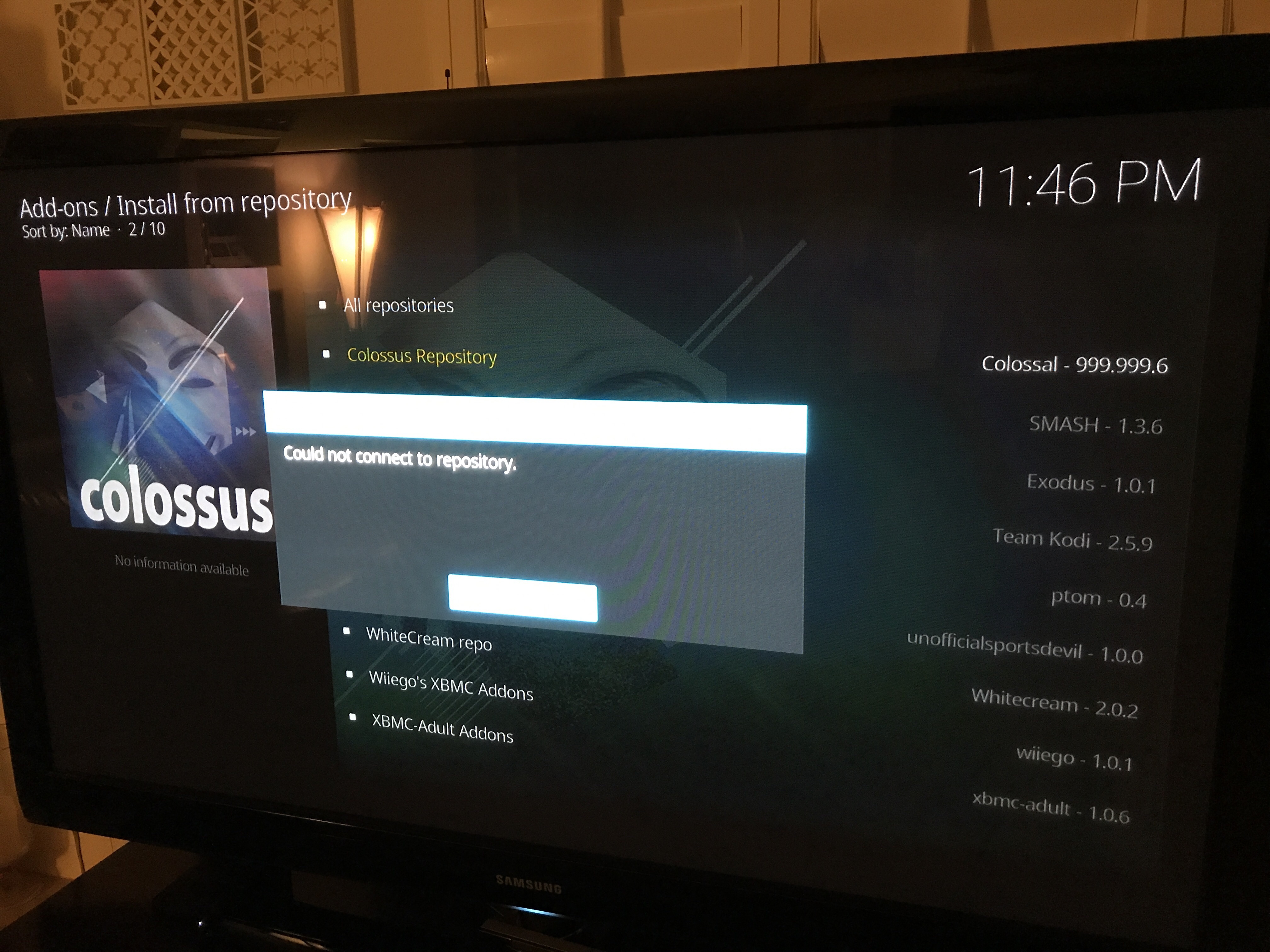
I wasn’t able to check the kodi logs. I don’t know how to get to it.
I’m at a loss when it comes to the issue of getting the “Could not connect to repository” when going into Colossus Repository. I’m not having that issue on any of my devices, but I know a lot of people are having that issue and commenting about it here. If I can’t replicate it, I can’t troubleshoot it. If anyone has any tips to share with everyone else, please let us know.
Mia, regarding the error logs, it’s not something you can see from the Kodi File Manager. You have to use a file browser app on your device and follow the path from the link I sent you previously.
Should I remove exodus or reinstall kodi?
Try this first. Go to Install from repository. Then with Colossus repository highlighted, press “C” or menu button, then select Information. Then select Uninstall.
Now, go back to Install from repository > -SMASH Repo > Add-on repository > Colossus Repository
Hopefully that will install properly and then you can install Covenant from the Colossus Repository.
I can only see one or two streams per movie/show and from providers I’ve never seen before. What can I do to see a full page like I used to see?
Real-Debrid.
What if Kodi doesn’t work at all? Every single add-on just shows the loading symbol but never, ever loads. Covenant, Phoenix, IceFilms… everything.
Woah, really? Have you tried closing and reopening Kodi? If it still does it after a restart, then I’m not sure. It could be the skin, are you able to change it?
I always close out kodi, and launch app when I want to use it. The skin is the default one, I’ve tried others but ended up going back to the original. I’m about to just give up and forget the money I spent on the firestick
The only thing I can think of is that there’s some add-on that’s gone rogue. Maybe go through the My Add-ons area and uninstall anything you don’t use.
I followed the set of instructions (on a Fire stick) and is said the add on had installed…..but where is it on Kodi….on my TV Shows menu i still have Zen, Exodus, Specto, Salts, UK Turks and MetalliQ
If you have no idea if you have the latest version, then you probably don’t. You probably have the old version which is likely the issue. Follow this tutorial to install the latest version over top of the old one. https://cyan-lapwing-671209.hostingersite.com/install-kodi-amazon-fire-tv-stick/
I keep getting a message stating that network connection failed.
Thank you. I’ve now installed the latest version but still no streams on anything works
Which add-on are you using? Covenant?
I keep getting a message stating that network connection failed. My internet is working just fine so I have no idea why the network would be down.
I can’t find out how to get to my file manager to do this.
In Kodi 17 using the Estuary skin, it’s in Settings (the cog icon) and then File Manager. If you’re using Kodi 16, it’s old and you would need to upgrade anyway. If using Kodi 17, but with the old Confluence skin, hit the down arrow on System, and you should get a dropdown which would have File Manager.
After you installed it, you couldn’t find it in your video add-ons? Are you sure you didn’t miss a step? Otherwise, maybe close and reopen Kodi and it might show up.
I keep getting a message stating that network connection failed.
Yep, Smash repo is down… https://cyan-lapwing-671209.hostingersite.com/smash-repo-is-down/
What’s going on? I can see if I can help.
Robyn, I just realized I forgot to update the URL in this post. It changed to… http://mediarepos.org/kodistuff